I landed at Incheon on a Tuesday night with three things on my phone: a hotel booking, a screenshot of the airport train timetable, and Google Maps. By Wednesday lunchtime I was standing outside exit 6 of a subway station, holding my phone at arm’s length like a compass, watching a blue dot drift around a block I could not find. The restaurant was 300 metres away. Google Maps knew where it was. It just would not tell me how to walk there.
That is the first shock of Korea, and it has nothing to do with language. Google Maps shows places, reviews and even bus and subway routes here, but it does not give you walking, driving or cycling directions in Korea. Tap the walking icon and you get a polite grey message: “Sorry, your search appears to be outside our current coverage area for walking.” The reason goes back to Korea’s rules on taking high-precision map data out of the country, which kept full navigation off Google’s Korean service for about two decades. That changed slowly: the government granted conditional permission in February 2026, confirmed in November 2026 that Google had met the security conditions, and Google has said it plans to bring walking and driving directions here — but as of late November 2026 the routes still were not there.
So the useful version of this article is not “install some apps”. It is the order you should do things in during your first week, with the exact menu paths, and the transit card that actually fits your length of stay. Most of the money people waste in their first week in Korea is spent on the wrong transit card, and most of the time is lost to a map app that cannot walk.
In this guide
1. Why Google Maps alone gets you lost
2. Naver Map vs KakaoMap vs Google Maps (table)
3. Step-by-step: switching the apps to English
4. Transit cards: T-money, Climate Card, K-Pass, WOWPASS, NAMANE
5. Fares, the airport train, and what your card will not cover
6. Delivery, translation and the 24-hour helplines
7. Printable first-week checklist
8. FAQ
1. Why Google Maps alone gets you lost
Three things work in Google Maps in Korea: the map itself, place search with reviews, and public transit routes. In a check run in Seoul in November 2026, transit routes came back normally for two sample trips, while walking, driving and cycling all returned the coverage message.
In practice that means Google Maps is how you decide where to go, and a Korean app is how you get there. The buses and subway you see in Google are also less detailed than local ones: no live “bus arrives in 2 minutes, 4 stops away”, no platform exit number, no indoor station map. For a first week, install Naver Map as your main app and KakaoMap as the backup. Both are free, both work without a Korean phone number or account for search and directions, and both have an English mode.
Keep one habit from home: before you leave Wi-Fi, screenshot the route. Both apps work offline only in a limited way, and a screenshot of “Line 2, exit 9” costs nothing.
2. Naver Map vs KakaoMap vs Google Maps
| What you need | Naver Map | KakaoMap | Google Maps |
|---|---|---|---|
| English interface | Yes | Yes | Yes |
| Other languages | Korean, English, Simplified Chinese, Japanese | Korean, English only | Many, but place data is thin |
| Walking directions | Yes | Yes | No (coverage error) |
| Bus / subway detail | Live arrivals, exit numbers, indoor maps | Live arrivals, good route comparison | Basic routes only |
| Driving navigation | Yes | Yes | No (coverage error) |
| Reviews in your language | Visitor reviews machine-translated | Mostly Korean | Best for browsing and photos |
| Booking & payment inside the app | Some booking and order features (passport verification for foreigners) | Hands off to Kakao T for taxis | Limited in Korea |
| Account needed? | No for search and directions | No for search and directions | No |
Checked against each app’s own help pages and store listings in November 2026. Apps update often, so treat menu labels as a guide, not a guarantee.
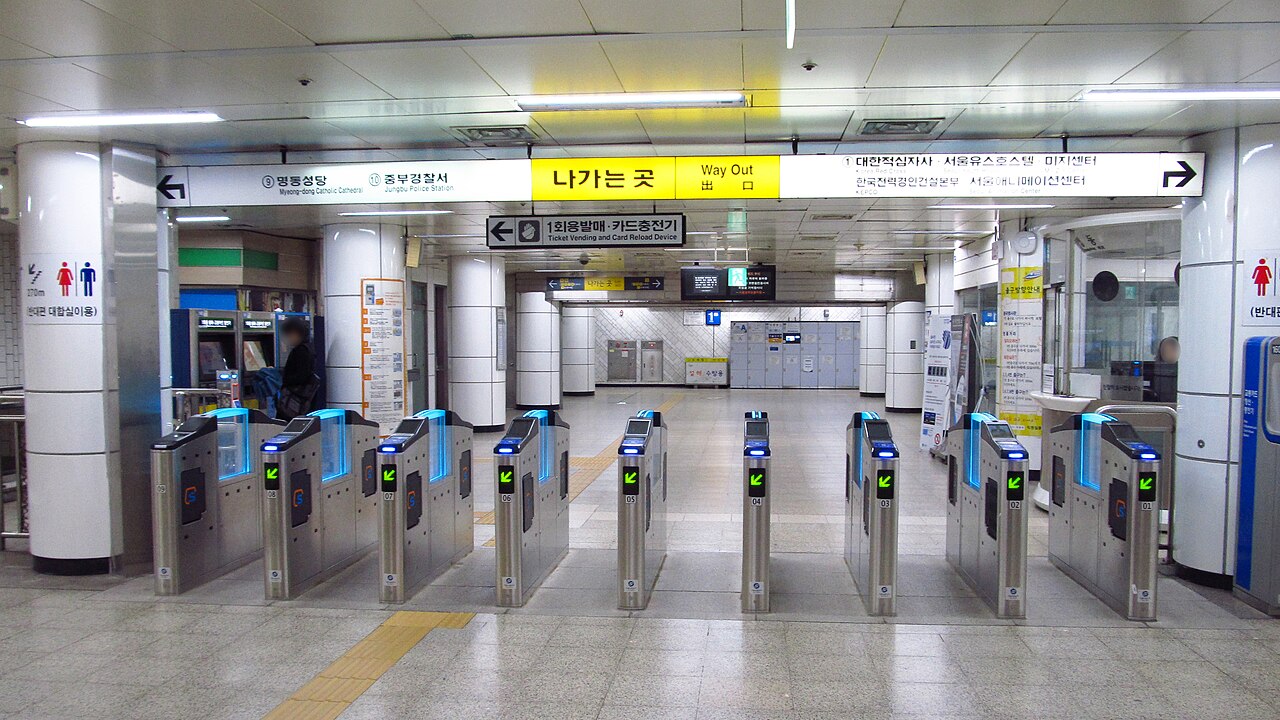
Myeongdong station ticket gates, Seoul Subway Line 4. The blue-lit reader on the right side of each gate is where your card goes.
3. Step-by-step: switching the apps to English
None of these apps ask for a Korean phone number to install or to look up a route. Do this on airport Wi-Fi, before you are standing on a platform.
The three apps this section installs, left to right: NAVER Map, KakaoMap, Kakao T.
Naver Map
Step 1. Install NAVER Map from the App Store or Google Play. Version 5.1.3 or later is required for the language setting, so accept the update if it asks.
Step 2. Open the app and allow location access while using the app.
Step 3. On Android, tap the MY tab at the bottom, then the gear icon at the top right, then Language (언어).
Step 4. On iPhone, use the same in-app path, or go to Settings > NAVER Map > Preferred Language. If that menu is missing, add English under Settings > General > Language & Region first, then come back.
Step 5. Choose English, close the app completely, and reopen it. Search a station to check.
What English gives you: menus, place names, addresses, opening hours, and translated visitor reviews. What stays Korean: some small shop names, user-written posts, and the built-in AI assistant, which answers only in Korean. If an English search fails, paste the Korean name copied from your booking confirmation, or search the shop’s phone number.
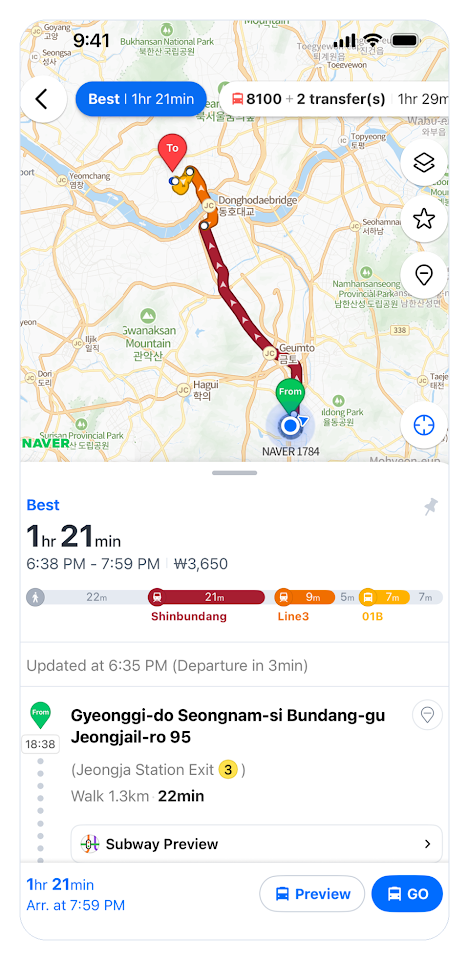
NAVER Map after switching to English: a subway route with line and bus changes, walking legs and arrival time — the screen you will actually use. (NAVER Corp. store listing)
KakaoMap
Step 1. Install KakaoMap (카카오맵). It works without logging in for search and directions.
Step 2. Tap the ••• icon at the right end of the bottom bar.
Step 3. Tap the gear icon at the top right of that panel, then under App settings (앱 설정) tap Language (언어).
Step 4. Choose English, then tap Restart (재시작) — not Cancel — on the pop-up. The app reopens in English in a few seconds.
KakaoMap has only Korean and English. In English mode the map labels are English only, so when you show a destination to a taxi driver you lose the Korean name — Naver Map keeps both. That is the main reason to install both.
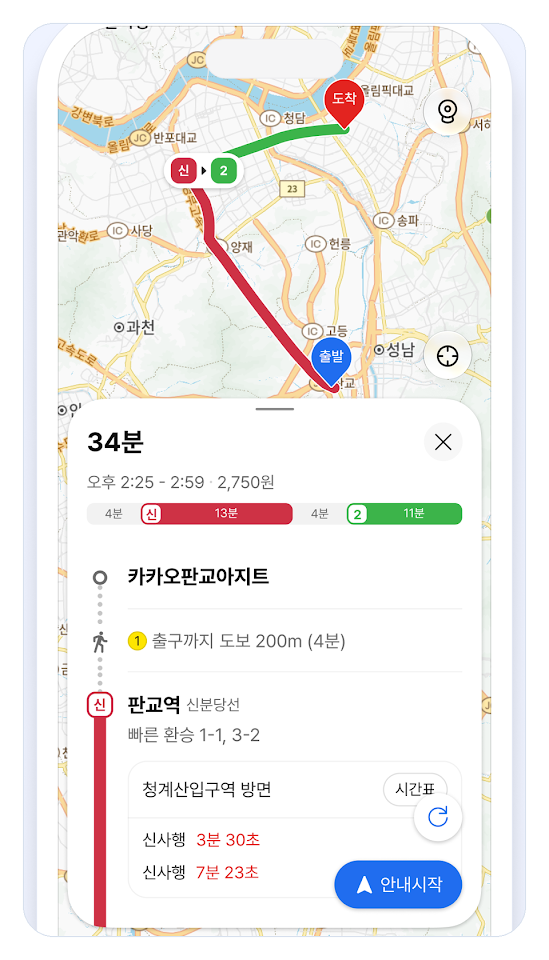
KakaoMap’s route screen. Kakao publishes no English screenshot, so this one is Korean — the app itself does switch to English. (Kakao Corp. store listing)
Baemin (food delivery) and other apps that follow the phone
Step 1. Baemin (배달의민족) has no language menu of its own. It follows the per-app language setting of your phone.
Step 2. On Android: Settings > Apps > Baemin > Language > English. On iPhone: Settings > Baemin > Language > English.
Step 3. Reopen the app. Search, menus, checkout and delivery tracking follow your choice; the shop’s own notice may still be Korean.
4. Transit cards: choose by how long you are staying
Korea has one tap-to-ride system and several cards that sit on top of it. They are not interchangeable, and the “best” one depends on three things: how long you stay, whether you have an Alien Registration Card (ARC), and whether you want to pay by card or cash.
| Card | Best for | Card price | How you load it | Getting money back | Watch out |
|---|---|---|---|---|---|
| T-money | Everyone; the default | ₩3,000–5,000 | Cash, ₩1,000–90,000 per top-up, at stores or station machines | Cash at stores or station counters, ₩500 fee, limits by chain | Card price is never refunded; top-ups are cash-only |
| Climate Card (short-term) | Tourists riding a lot inside Seoul | ₩3,000, plus a pass | A pass: 1/2/3/5/7 days, charged on the day you start | Refund through T-money website within 15 days of expiry | Seoul only; no advance charging; excludes Sinbundang and GTX |
| Modu Card (K-Pass) | Students and long stays with an ARC | Issue fee set by the card company | Postpaid card, or prepaid app card | Not a refund: cash back each month on what you spent | Needs ARC + identity verification; 15 rides a month |
| WOWPASS | Tourists who want one card for money + transit | ₩6,000 (₩5,500 if pre-booked in the app) | Cash at a WOWPASS kiosk, free; card in the app, 4% fee | Kiosk withdrawal ₩1,000 per ₩100,000; transit balance refund ₩500 | Foreign passports only; two separate balances |
| NAMANE | Tourists who want a custom card, no passport scan | ₩7,000 at a kiosk (₩6,000 online) | Cash or card at kiosks, app with a foreign card from ₩10,000 | Free within 7 days if unused; after that 60% spend rule applies | MONEY BOX cash-out fee ₩1,200; strict refund rules |
Prices and rules checked against T-money, the Seoul Metropolitan Government, WOWPASS and NAMANE pages in November 2026.
T-money: the one to buy at the airport
Buy the card at a convenience store in the arrivals hall (GS25, CU, 7-Eleven) — about ₩3,000 for a plain card, up to ₩5,000 for a character design. The card price is not refunded, ever, so do not pay extra for a design you will throw away.
Then hand the clerk cash to load it. That is the part that catches people: a plain T-money card is topped up with won in cash, in units of ₩1,000, from ₩1,000 to ₩90,000 at a time. Korean credit cards only work at some Woori Bank ATMs and GS25 counters, so a foreign card will not do it. Change a little cash at the airport, or withdraw from an ATM, before you queue at the counter.
T-money works on every subway line in the country, city and intercity buses, taxis, and convenience stores. If you are staying longer than a month and riding daily, keep topping up the same card — there is no membership and nothing to register.
Climate Card: unlimited rides, Seoul only
The Climate Card (기후동행카드) is the pass that made short trips cheap: one payment, unlimited subway and Seoul city buses for the period you choose. The short-term passes for visitors are still on sale, at these prices:
| Pass | Price | Per day | Rides to break even |
|---|---|---|---|
| 1 day | ₩5,000 | ₩5,000 | 4 |
| 2 days | ₩8,000 | ₩4,000 | 6 |
| 3 days | ₩10,000 | ₩3,333 | 7 |
| 5 days | ₩15,000 | ₩3,000 | 10 |
| 7 days | ₩20,000 | ₩2,857 | 13 |
| 7 days, age 13–18 | ₩13,000 | ₩1,857 | age check required |
Break-even counts rides at the ₩1,550 adult subway fare, with the ₩3,000 card already owned. Figures from Seoul Metropolitan Government, November 2026.
The details that decide whether it works for you:
- The charge day is day one. You cannot load a pass in advance for next Monday. Charge a 3-day pass on Monday and it covers Monday, Tuesday and Wednesday, from the first train at 04:00 to the last train on the final day (usually around 04:00 the next morning).
- It is Seoul-only since 1 October 2026. Stations in Gimpo, Goyang, Gwacheon, Guri, Seongnam, Hanam and Namyangju dropped out. You can ride out to Incheon Airport T1/T2, but you cannot start a trip at the airport stations.
- Sinbundang Line and GTX are excluded, and so are express and airport buses. Get off outside Seoul on a covered line and you pay the fare separately at the gate.
- iPhone users get the plastic card (₩3,000, from the vending machines inside Lines 1–8 stations, or convenience stores near Line 9, Ui-Sinseol and Sillim stations). The mobile version needs an Android phone on OS 12 or later.
- Foreign cards work at station machines. Since 17 March 2026 the new vending machines on Lines 1–8 accept overseas Visa and Mastercard for single tickets and Climate Card passes, with an average service fee around 3.7%. A plain T-money top-up is still cash-only.
The 30-day card is gone. The old 30-day Climate Card stopped taking recharges on 31 August 2026 and ended on 1 October 2026. Its replacement, the Climate Pass (기후동행패스), runs on the K-Pass system and is for Seoul residents. If you read a 2024 or 2025 guide quoting “₩62,000 for 30 days”, that price no longer buys you anything.
Modu Card / K-Pass: cash back, but only with an ARC
K-Pass was renamed Modu Card (모두의카드) in 2026 and it is the best transit deal in the country — for people who qualify. You get back either a percentage of what you spend (20% general, 30% for ages 19–34, 50% for families with three or more children, 53.3% for low-income) or everything above a monthly threshold (₩62,000 general in the Seoul metropolitan area), whichever is larger, calculated automatically. The catch is the door: you need a dedicated card issued by one of the participating card companies, and you must register it online.
Foreigners can join, and Seoul City states it plainly: with an Alien Registration Number and a way to verify your identity (bank certificate, phone verification, or a joint certificate), you can sign up. Students who hold an ARC, D-2 and similar, can join; a tourist on a 90-day visa waiver has no ARC and cannot. You also need to ride public transport at least 15 times a month — and one bus-plus-subway trip with a transfer counts as one ride, not two.
Two useful details: as a fuel-price response measure, riding in the quieter windows (05:30–06:30, 09:00–10:00, 16:00–17:00, 19:00–20:00) lifts the percentage refund by 30 points — currently scheduled through the end of 2026 — and the refund lands with your card company in the first week of the following month. Airport buses, KTX and SRT are not counted.
WOWPASS and NAMANE: the tourist cards with an exchange desk inside
Both cards hold two balances — money you spend in shops, and a transit balance for gates and buses — and both let you top up at a kiosk. Where they differ is what happens to your leftover money.
WOWPASS (₩6,000 at a kiosk, ₩5,500 if you reserve in the app) is issued only to foreign passports. You feed cash or a foreign card into a kiosk and it converts at a rate close to the market — 16 currencies are supported, with no exchange fee. To use it on the subway you top up the T-money side separately, which you can do with cash at a convenience store, at a blue T-money machine in a station, or through the app by holding the card against your phone. Leftover cash comes out at a kiosk for ₩1,000 per withdrawal, up to ₩100,000 each time — but not at the machines inside the Incheon Airport AREX area, so withdraw before you go. The T-money side is refunded at a store for ₩500.
NAMANE (₩7,000 at a kiosk, ₩6,000 online) is the one you can print your own photo on, and it needs no passport scan at issue. It uses the Rail+ transit system and lets you move money between the spending balance and the transit balance in the app, ₩30,000 at a time, five times a month, ₩500 per transfer — WOWPASS does not allow that direction at all. The refund rules are the strict part: a full refund is only comfortable within 7 days of topping up if you have not spent it, and after that you generally need to have spent more than 60% of the balance. Cash-out at MONEY BOX (Myeongdong, Seoul Station) costs ₩1,200 and needs your passport; CU ATMs pay out ₩1,000–30,000 for a ₩1,000 fee.
My advice after all of this: buy a plain T-money card on day one and load only what you need for three or four days. Add the Climate Card pass only if you are staying in Seoul and will ride four or more times a day. Leave WOWPASS and NAMANE for people who genuinely need to convert cash at a kiosk — the card fee and the cash-out fees quietly cost more than a T-money card and a little discipline.
5. Fares, the airport train, and what your card will not cover
| Ride | Adult fare | Notes |
|---|---|---|
| Seoul subway, up to 10 km | ₩1,550 with a card | ₩1,650 for a single-ticket machine (+₩500 deposit returned at the exit) |
| Seoul blue/green bus | ₩1,500 | Transfer to subway within 30 minutes and pay one base fare |
| AREX all-stop train, T1 → Seoul Station | ₩4,750 with T-money | ₩5,350 from T2. Stops everywhere, about 59–66 minutes |
| AREX Express, non-stop | ₩13,000 | Assigned seat, 43 minutes, own QR ticket — T-money and Climate Card do not work |
| Sinbundang Line, GTX | Normal fare | Not covered by the Climate Card pass |
Subway fares from Seoul Metro (in force since 28 June 2025); AREX fares from the Airport Railroad, October 2026.
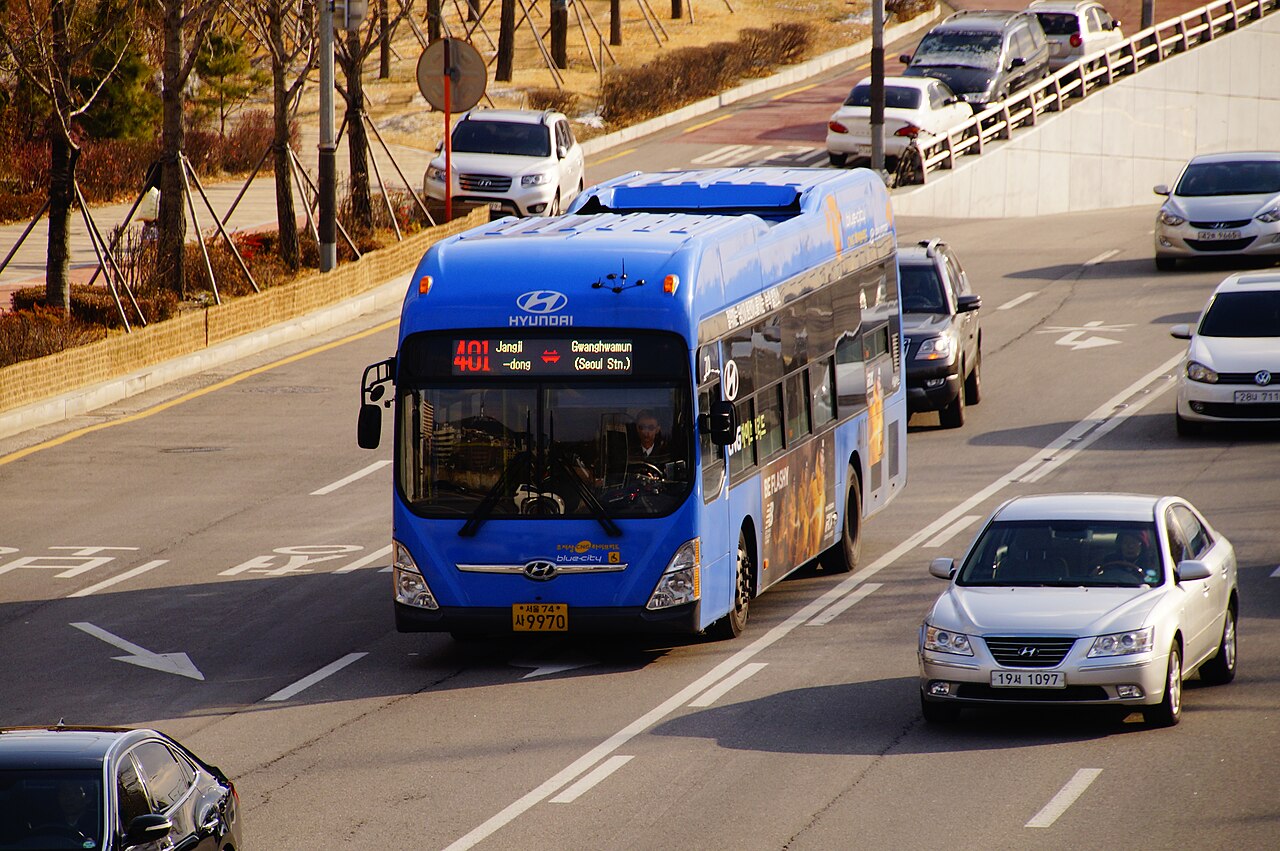
A blue trunk bus. Blue buses cross the city, green ones circle a neighbourhood — both take the same tap.
At the airport, the practical choice is usually the all-stop train: it costs ₩4,750 from Terminal 1 to Seoul Station and stops at Hongik University and Gongdeok, which is where a lot of short-stay visitors are actually going. The Express is worth the ₩13,000 only if you are heading to Seoul Station with luggage and want a guaranteed seat. On the way home, remember the Climate Card cannot start a trip at the airport stations, so top up T-money for that last ride.
6. Delivery, translation and the 24-hour helplines
Food delivery: two routes, pick by your phone number
Baemin (배달의민족) is the app Koreans use, and it has changed a lot for visitors. English, Chinese and Japanese screens arrived in February 2026; foreign credit cards have been accepted for non-members since March 2024, charged in won; Apple Pay with overseas Visa, Mastercard, JCB and Amex cards works since 2 June 2026; and the company says no Korean phone number is required — you verify an overseas number by text and order as a guest. WeChat Pay and Alipay+ sit under “Global Payments” at checkout. The limit to know: guest ordering means no in-app chat support, so a missing order has to go through the phone line (1600-0987) instead.
Shuttle Delivery is the English-first alternative, and the safer pick if Baemin’s phone verification fails. You sign up with an email address, no Korean number, pay by foreign credit card or PayPal, and get English live chat. It runs 10:00–22:00 daily including holidays, but only in parts of Seoul (Yongsan, Gangnam, Mapo, Seodaemun, Jung, Jongno, Gwangjin), Pyeongtaek, Osan, Daegu and central Busan — check your address in the app before you plan dinner around it.
Taxi, translation, and the numbers to save
Taxis: Kakao T takes foreign Visa, Mastercard, JCB and Amex cards for taxis (the card must be in the same name as your account), and on a regular call you can skip the card entirely and pay the driver at the end. Signing up needs a Kakao account and a text code — if your SIM cannot receive it, use k.ride, Kakao Mobility’s app for visitors, which signs you up with Google, Apple or email and translates the trip in 133 languages.
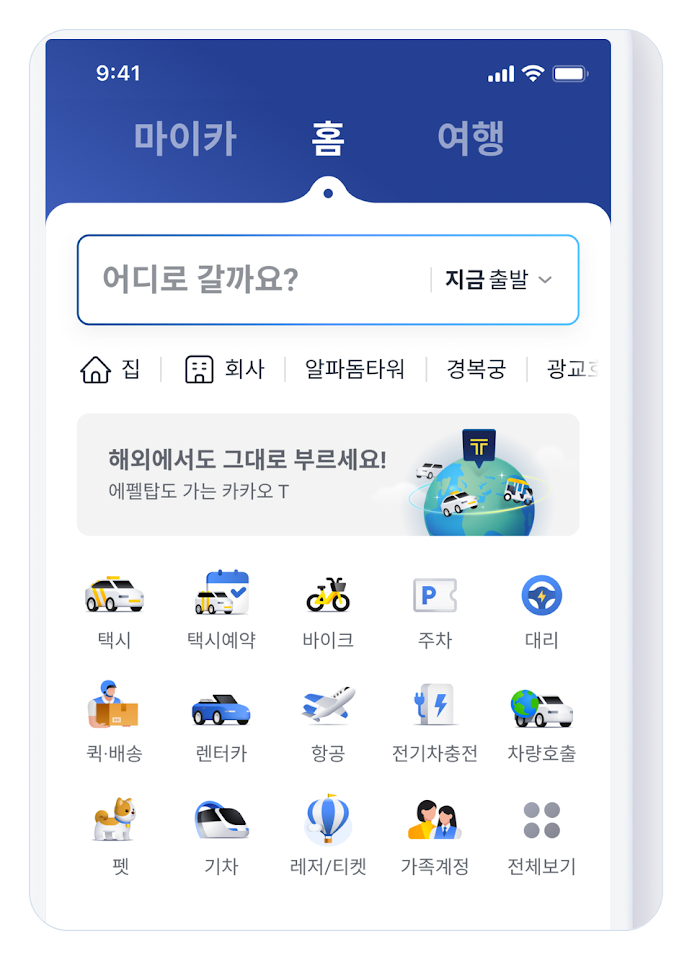
Kakao T’s home tab: the Where to? (어디로 갈까요?) box at the top and the taxi icon in the row below it are all you need for a ride. (Kakao Mobility store listing)
Translation: Papago (by Naver) is the one locals use for Korean; its camera mode reads menus and signs, and its voice mode handles short conversations. Google Translate works too, but Papago is noticeably better with Korean particles and shop names. Point the camera at a menu before you order, not after.
Numbers worth saving in your phone on day one:
- 1330 — Korea Travel Hotline, free, 24 hours in Korean, English, Japanese and Chinese (Russian, Vietnamese, Thai and Malay/Indonesian from 08:00 to 19:00). They interpret for you with a taxi driver, a landlord or a clinic, and connect you to other services. From abroad: +82-2-1330.
- 119 — fire and ambulance, with foreign-language interpretation available for emergency calls.
- 112 — police.
- 1345 — immigration and foreigner services, for visa and ARC questions.
7. Printable first-week checklist
Save this post once, then print this box or export the page as a PDF from your browser (Ctrl/Cmd + P). It is written to be useful on paper: no links to tap, just the things that go wrong.
Printable First-Week Korea Survival Checklist
Name: ______________________ Arrival date: ____________ City: ____________
Before you fly
☐ Install Naver Map and KakaoMap on the phone you will carry
☐ Install Papago and download the Korean offline pack
☐ Screenshot your hotel’s name and full address in Korean
☐ Decide SIM or eSIM, and check your phone accepts it
☐ Keep a card that works abroad, plus some won cash if you can get it
☐ Save 1330, 119 and 112 in your contacts
At the airport
☐ Pick up or activate your SIM/eSIM; test a text message
☐ Buy a T-money card at a convenience store (₩3,000–5,000)
☐ Load ₩20,000 in cash — not more than you will use in a week
☐ Choose the all-stop train (₩4,750) unless you have heavy luggage
☐ Switch Naver Map to English and save the hotel as a bookmark
☐ Withdraw or change enough cash for two more top-ups
First 7 days
☐ Tap in and out on every ride — a missed tap-out charges the full fare
☐ Learn your two nearest stations and the correct exit number
☐ Set up Kakao T, or k.ride if your number cannot receive the code
☐ Place one Baemin or Shuttle order while you still have patience for it
☐ Check whether your stay qualifies for a Climate Card pass (4+ rides a day)
☐ If you have an ARC, apply for the Modu Card and register it
☐ Spend down the T-money balance to under ₩20,000 before you fly home
☐ Keep the empty card — it works again on your next trip
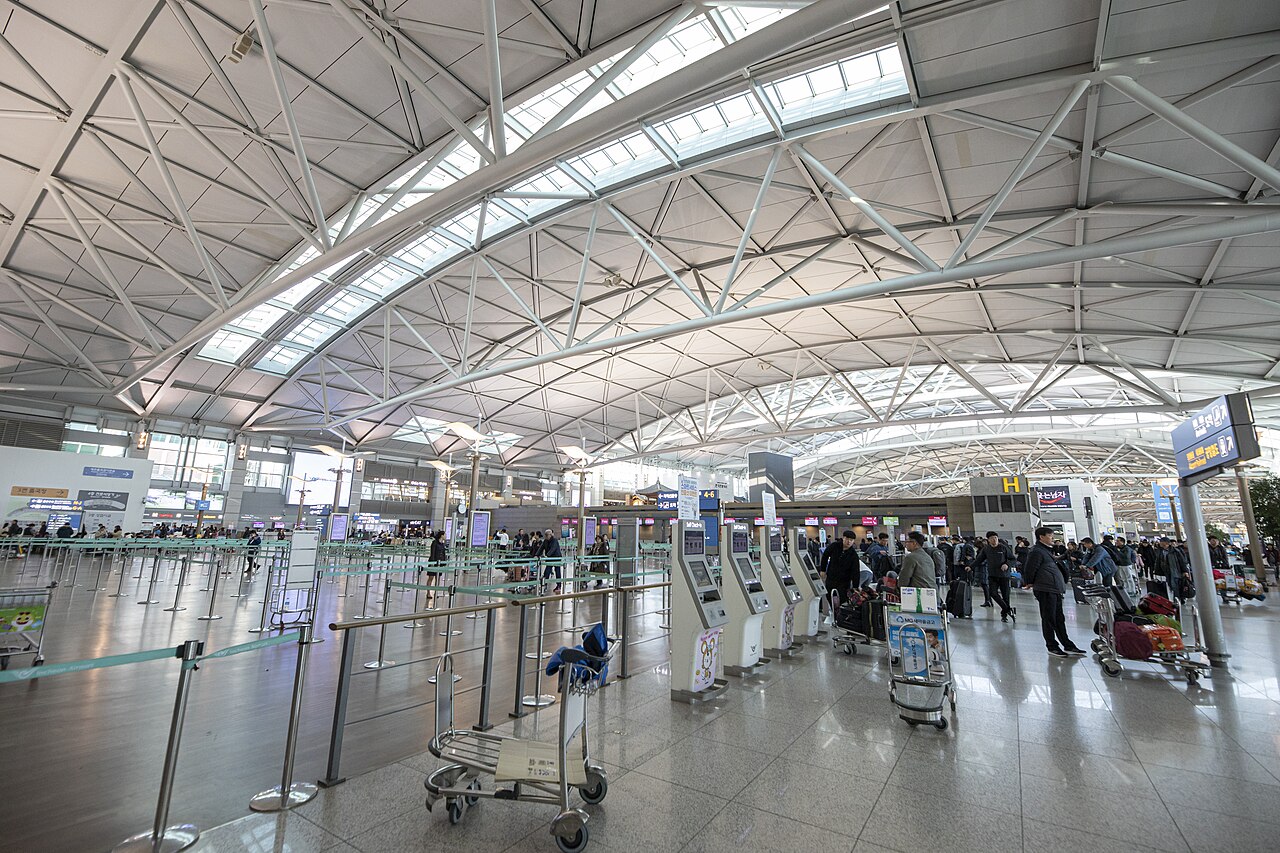
Incheon International Airport Terminal 1. Buy the T-money card and load it with cash before you leave the arrivals floor.
8. FAQ
Can I top up T-money with my foreign credit card?
Not reliably. A plain T-money top-up is cash in won — at a convenience store counter or a station machine, ₩1,000 to ₩90,000 at a time. The machines on Lines 1–8 that accept overseas Visa and Mastercard since March 2026 are for single-journey tickets and Climate Card passes, not T-money top-ups. If you must use a card, WOWPASS lets you load cash-free at a kiosk with a foreign card, at a 4% fee in the app.
Do I really need cash in Korea?
Less than you think, but some. Cards work almost everywhere, including taxis and markets. You need cash for three things in your first week: topping up a T-money card, some small street food and market stalls, and a recharge at an older station machine. ₩50,000 in your wallet covers a week comfortably.
SIM or eSIM — which one should I get?
An eSIM if your phone supports it and you want to be online the moment you land: buy and install it before you fly, and it activates on arrival. A physical SIM is the safer choice if you need a Korean phone number for verification codes and bookings, because a Korean tourist SIM with voice can receive texts while a data-only plan usually cannot. Either way you need your passport to register the line, and either way, do not expect your home number to receive Korean verification texts.
Is the Climate Card still worth it without the 30-day pass?
For a trip of a week or less, yes, if you stay inside Seoul and ride four or more times a day — the 5-day pass at ₩15,000 works out at ₩3,000 a day, which is two subway rides. For longer stays, the old 30-day pass no longer exists; the replacement (Climate Pass, run on the Modu Card system) is for Seoul residents with an ARC. Everyone else should use T-money.
Can I get my leftover balance back before I fly home?
Yes, in cash, minus a ₩500 fee, if the balance fits the counter’s limit: under ₩20,000 at GS25, up to ₩20,000 at 7-Eleven, up to ₩30,000 at CU and emart24, and up to ₩50,000 at a subway information centre in Seoul. Above ₩50,000 you have to go to Tmoney Town at Seoul Station Exit 10 on a weekday (09:00–18:00). The card’s own price is never refunded.
Will Google Maps walking directions come back?
Google says it plans full navigation for Korea, including walking and driving, and in November 2026 the government confirmed Google had met the conditions for using high-precision Korean map data. Reports put the launch at early 2027. Until it appears on your own phone, plan around Naver Map — and check the walking mode yourself rather than assuming.
Save this post. Bookmark it, or print the checklist above and keep it in your bag for the first week. If something here has changed by the time you land — fares and pass rules move every year — the official pages are Seoul Metropolitan Government (english.seoul.go.kr), T-money (pay.t-money.co.kr) and Korea Tourism Organization (english.visitkorea.or.kr).
Photos: Myeongdong station ticket gates by LERK (CC BY-SA 4.0); Seoul city bus 401 by Mtattrain (CC BY-SA 4.0); Incheon International Airport Terminal 1 by Arne Müseler (CC BY-SA 3.0 de), all via Wikimedia Commons. App icons and app screens: NAVER Corp. and Kakao Corp. official Google Play and App Store listings.